
Plenty of shoppers want to see or try a product before buying it. If your brand is stocked in shops, a visitor who cannot find the nearest one is a sale lost to whatever else is on the shelf.
Why it matters
Brands often hide stockists in a PDF or a plain address list. Shoppers then have to work out which shop is close and open right now, and most will not bother.
When your site sends customers into partner shops, those partners have a reason to keep stocking you. For your own stores, it answers the most common phone question: are you open today?
What the section does
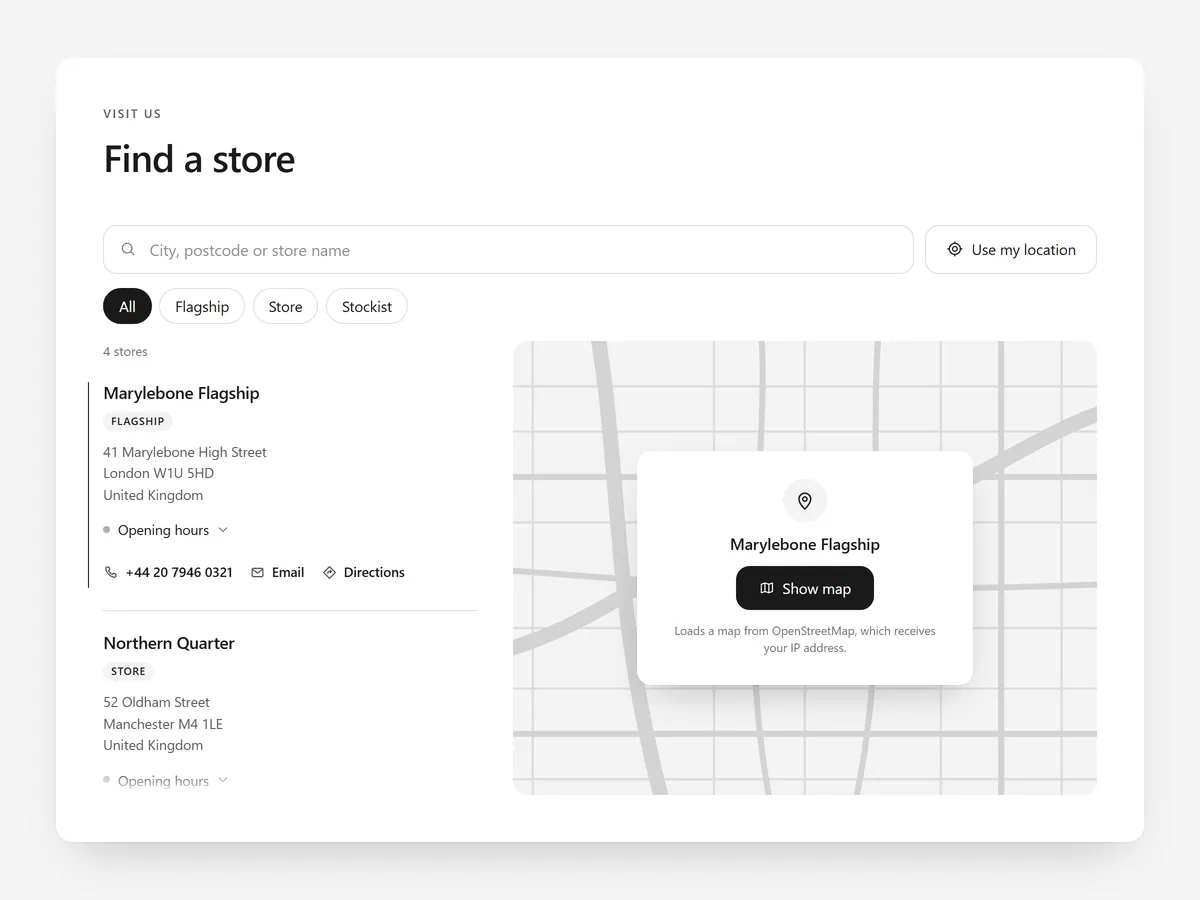
Store Locator is a searchable store and stockist list with opening hours and a privacy-friendly map. It fits a dedicated 'Find a store' page, and a compact version works on the home page or in the footer area.
- 01You choose a list with a map, the map on top, or photo cards for flagship stores with character.
- 02An 'open now' label is computed from the opening hours you enter, so shoppers do not have to read timetables.
- 03Shoppers can search, filter by tags such as 'stockist' or 'own store', and tap 'Use my location' to sort by distance.
- 04Locations come in by CSV import, and the map loads only after a click, which keeps the page light.
Where to place it and what to write
Give it its own page and link it from the main menu and the footer. On product pages for items that sell well in person, link to that page instead of embedding the full locator.
- 01Headline the action: 'Find us near you' beats 'Our retailers'.
- 02Use tags that match how shoppers search: own stores, stockists, pop-ups.
- 03Keep opening hours current, including holiday hours.
- 04Add a photo card only where the store is worth visiting for itself.
Set it up in three steps
After saving, test search and 'Use my location' on your phone, check 'open now' and confirm the theme font. The block renders plain HTML and CSS, and the map waits for a click, so speed is unaffected.
- 01Open Store Locator in Section Store, import your locations by CSV and pick a layout in the visual builder.
- 02Click Theme blocks → Add to theme; the theme editor opens with the block placed.
- 03Put it on your store-finder page template and save.
Conclusion
A locator that answers 'where' and 'is it open' sends ready buyers to your shelves. The Store Locator section is a one-time purchase of $19.99 in Section Store, or part of the Enterprise Plan.
Key takeaways
- 01Shoppers want the nearest open store, not a list of addresses.
- 02CSV import makes it easy to keep stockists current; outdated lists cost trust.
- 03The map loads only on click, keeping the page fast and privacy-friendly.
Explore more




