AI Sections for the Enterprise Plan

All appsSection StoreTheme sections

Ready-made sections.Zero theme code.

Add hero slideshows, bundles, reviews, size guides, trust badges and more to any Online Store 2.0 theme. Customize them in a visual builder with live preview, then add them to the right page in one click.

  • Free to install
  • 14 free sections
  • No theme code edits
  • Built by a Shopify Partner
Section Store
Section Store
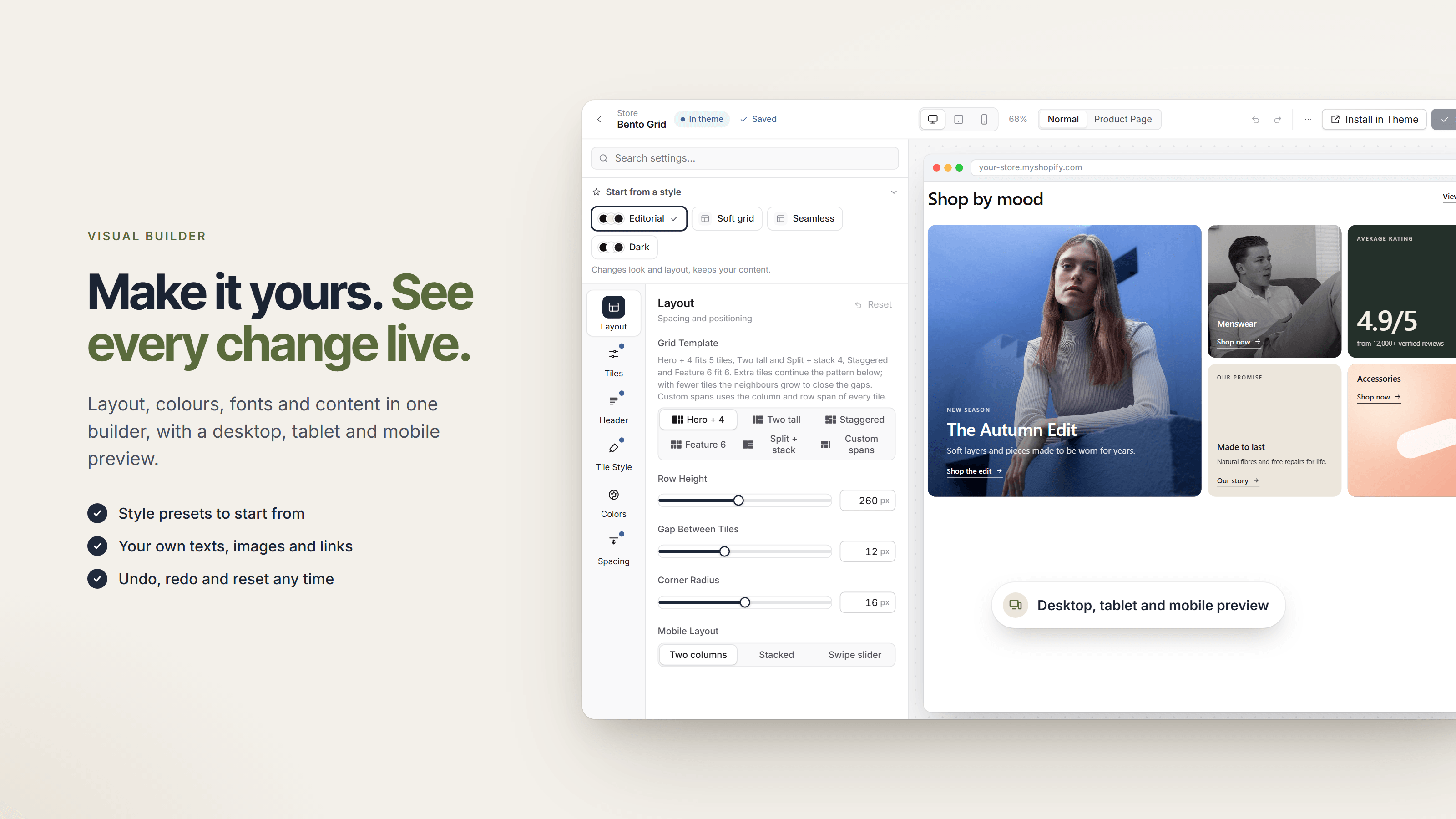
Section Store builder with style presets and layout settings for a bento grid next to its live preview
  • 14 freeSections to start with, no purchase needed
  • From $9.99Premium sections as a one-time purchase
  • 1 clickFrom the builder into the theme editor, at the right spot
  • 5 languagesApp in English, German, French, Spanish and Chinese

What Section Store does

The sections your theme is missing.

Section Store gives your theme the sections it does not have, without a page builder and without touching theme code. Pick a section, make it yours, add it in one click.

Section library

One library for every page of your store.

Hero slideshows and bento grids for the homepage, buy boxes and quantity breaks for product pages, collection headers, cart upsells, FAQs, contact pages, headers and footers. Every section is built to look finished with its default settings.

  • Sections for product pages and the homepage
  • Sections for store pages like contact, shipping or about us, plus header and footer
  • 14 sections are free, including Trust Badges, Countdown and Marquee
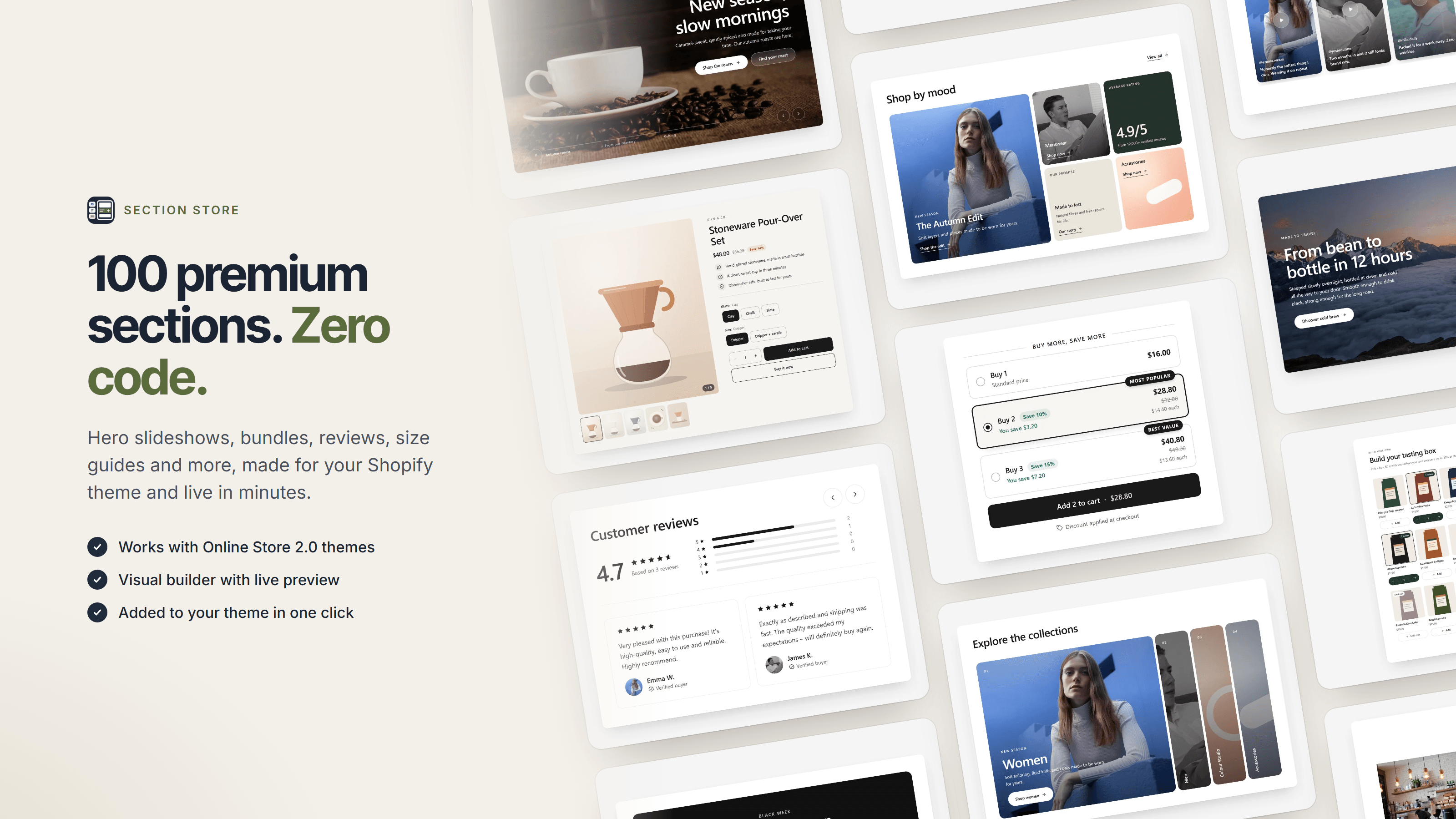
Collage of Section Store sections: hero slideshow, featured product, quantity breaks, customer reviews and a bento grid

Section library

Find the right section in seconds.

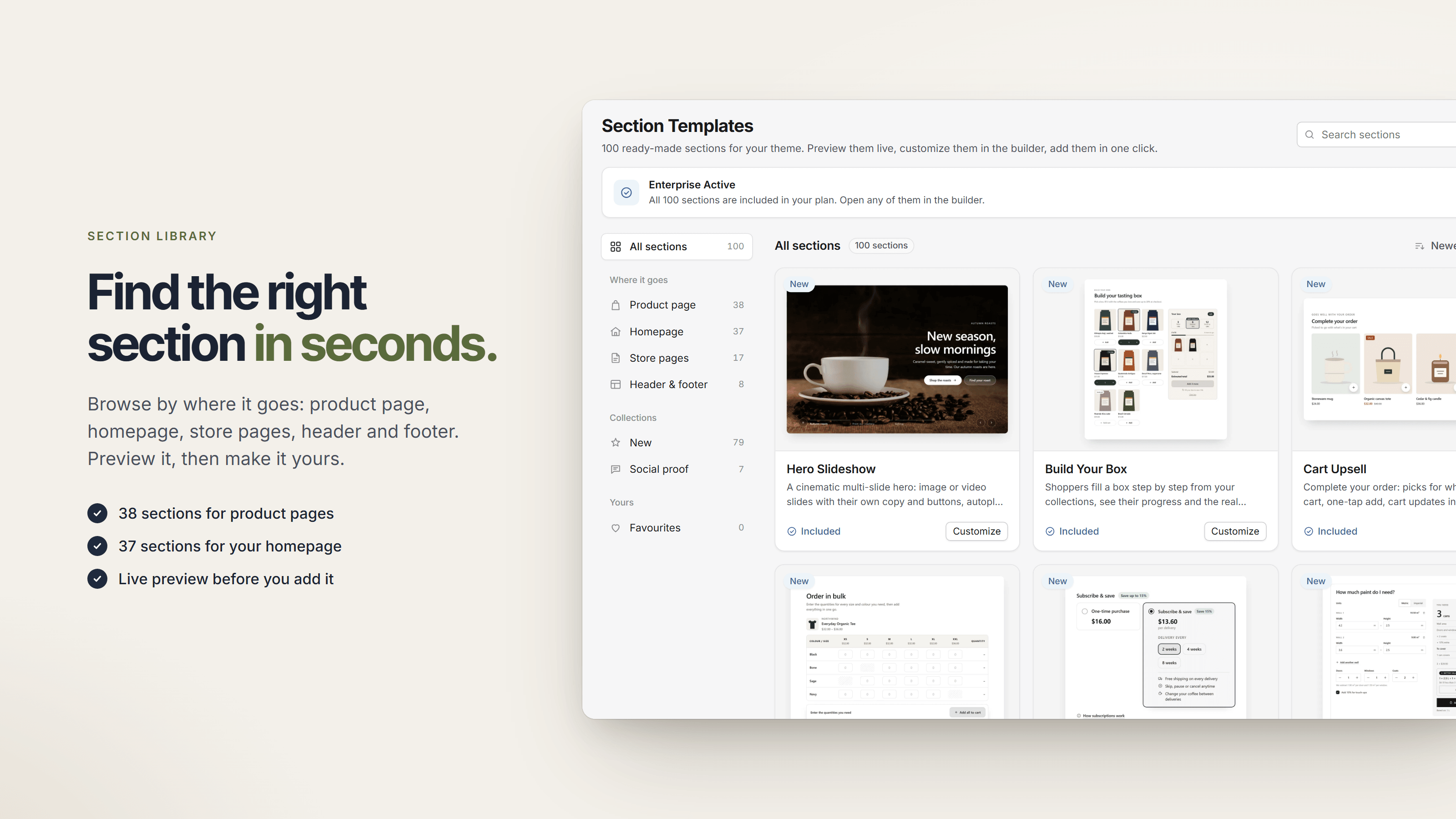
Browse the library by where a section goes: product page, homepage, store pages, header and footer. Search by name, filter by price, save favourites and preview every section live before you buy or customize it.

  • Sorted by placement, with search and price filter
  • Live preview of every section before you decide
  • Favourites and a list of what is new
Section Store
Section library in Section Store, sorted by product page, homepage, store pages and header and footer, with section cards

Visual builder

Make it yours. See every change live.

Texts, images, colours, layout and spacing are set in one builder, next to a live preview. Start from a style preset, switch between desktop, tablet and mobile, and see product page sections in a product page view.

  • Style presets that change the look and keep your content
  • Desktop, tablet and mobile preview
  • Undo, redo, reset per group and a settings search
Section Store
Section Store builder with style presets and layout settings for a bento grid next to its live preview

Product pages

Everything a product page needs to sell.

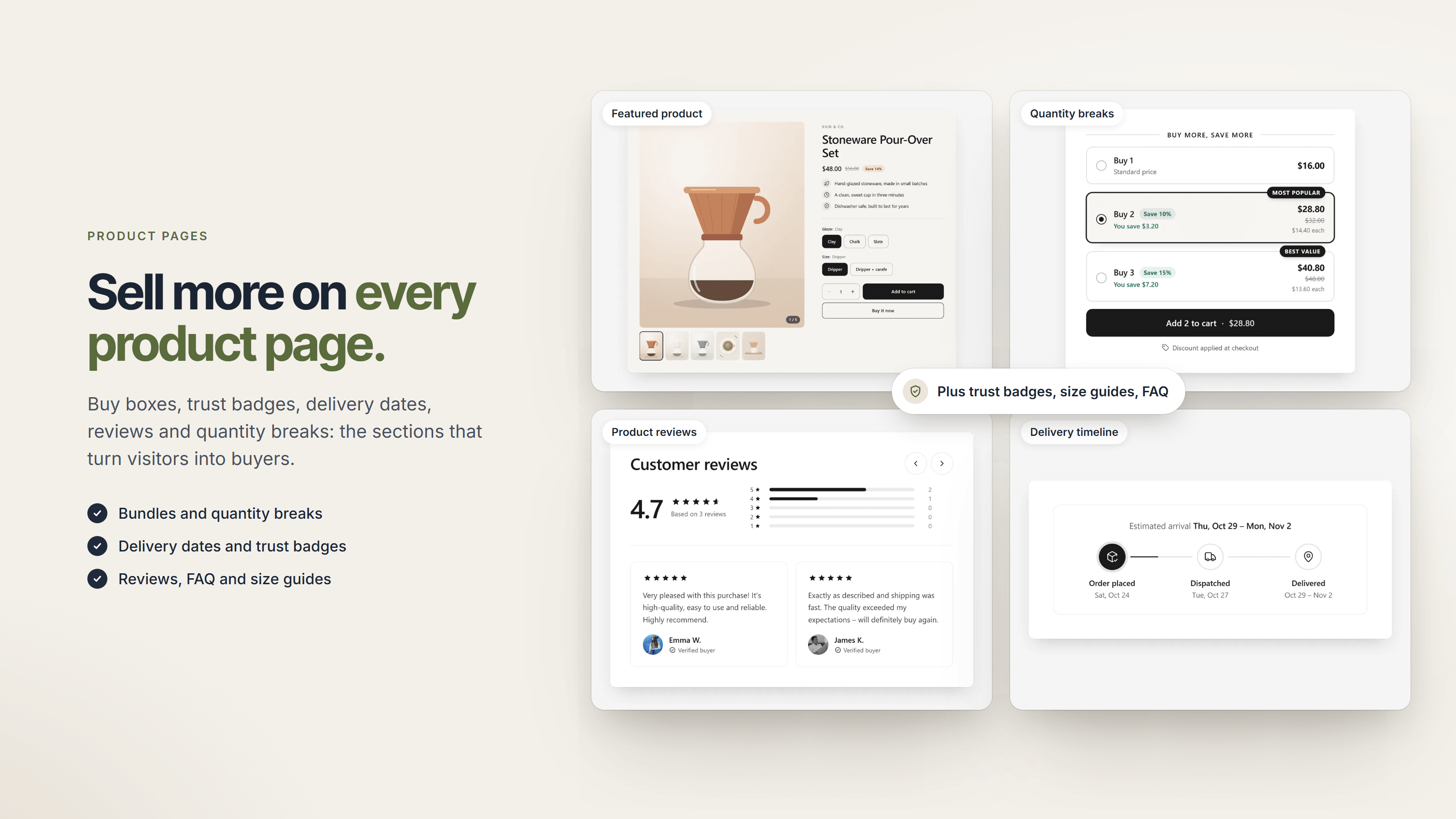
Buy boxes, bundles and quantity breaks, delivery dates and timelines, reviews, size guides, FAQs and trust badges. Product page sections read the product they sit on, so one setup works across your catalog.

  • Bundles, quantity breaks and sticky add to cart
  • Delivery timeline, trust badges and payment info
  • Reviews, product tabs, FAQ and size guides
Product page sections from Section Store: featured product, quantity breaks, customer reviews and a delivery timeline

Your theme

One click into your theme. Always know what is live.

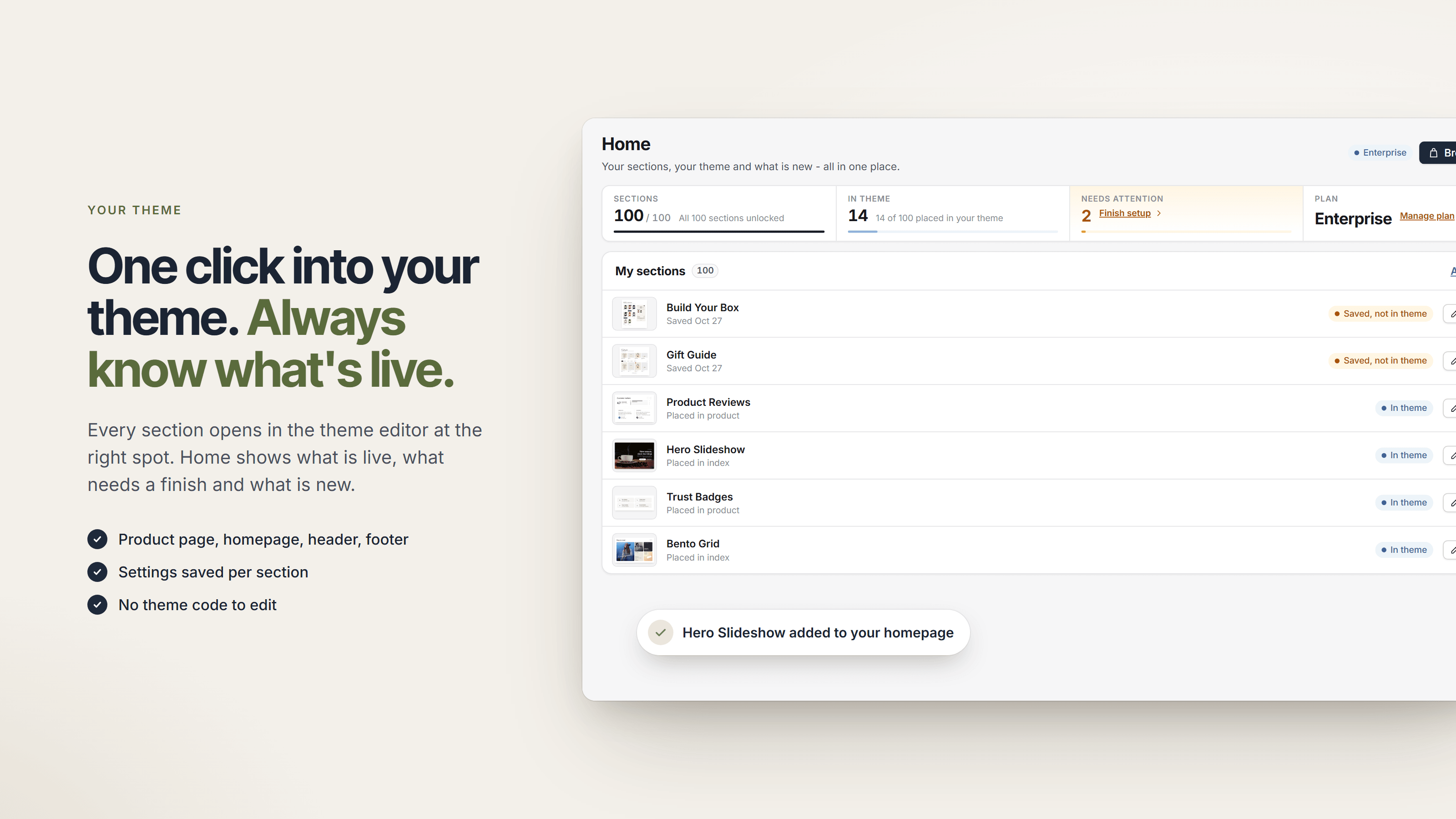
Install in theme opens the Shopify theme editor with the section already placed on the matching template. Your settings are stored by the app, not in theme files. The home screen shows which sections are live, which are saved but not yet in the theme, and what is new.

  • Placed on product page, homepage, header, footer, collection, cart or page
  • Status per section: in theme, saved, not set up yet
  • No theme code to edit, and uninstalling removes the blocks
Section Store
Section Store home with unlocked sections, sections placed in the theme and a list of sections with their theme status

Store analysis

Enterprise

Find out what your store is missing.

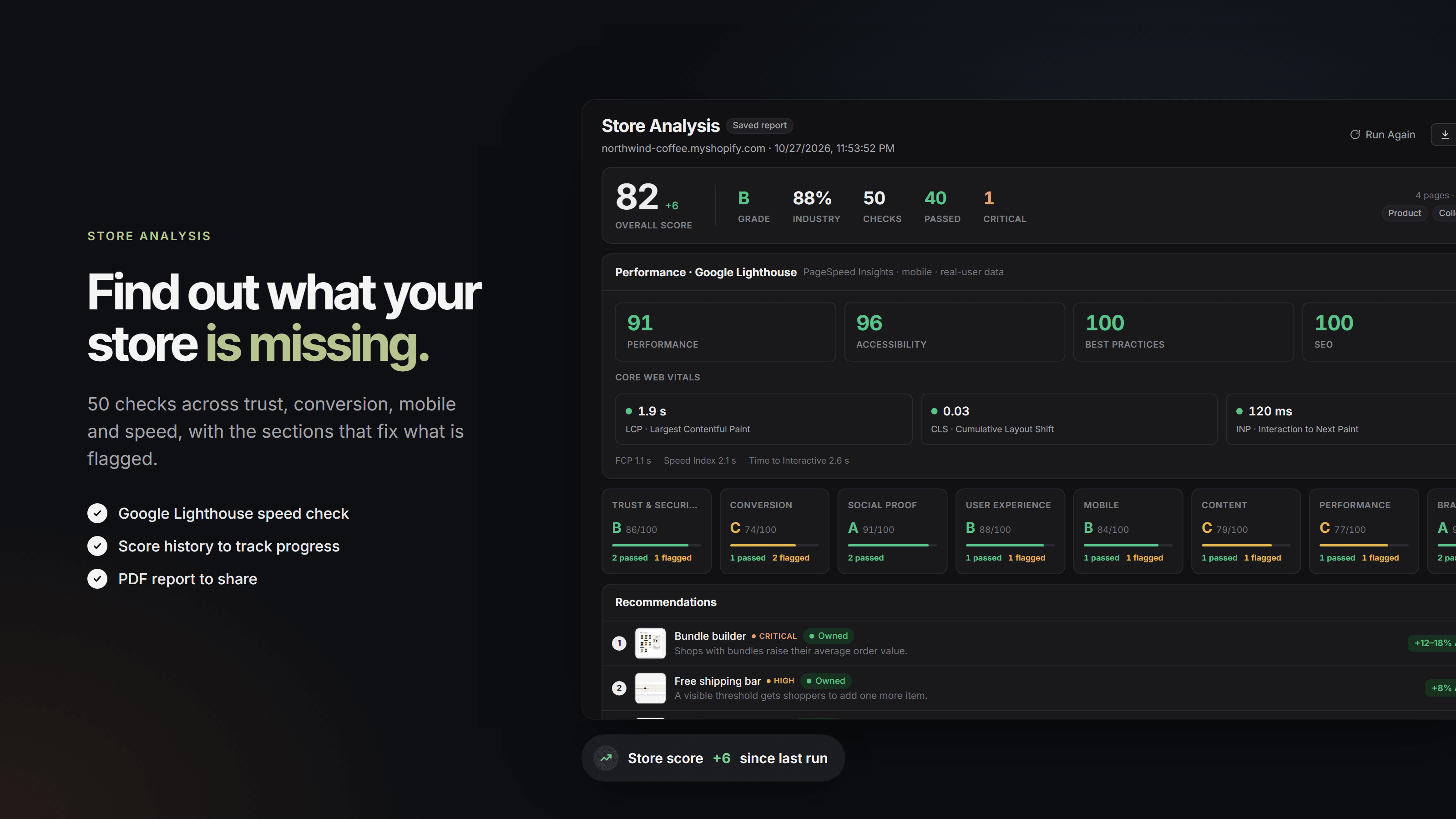
The store analysis checks your home, product, collection and cart pages in about 30 seconds. It grades trust, conversion, social proof, user experience, mobile, content, performance and branding from A to F, and points to the section that fixes each gap.

  • Google Lighthouse speed check with Core Web Vitals
  • Score history to track progress between runs
  • PDF report to share with your team
Section Store
Store analysis in Section Store with overall score, Google Lighthouse results, grades per category and recommended sections

How it works

From library to live store in three steps.

  1. Pick a section

    Install Section Store from the Shopify App Store, browse the library by page and open a free section, or buy a premium one with a one-time payment.

  2. Customize it

    Change texts, images, colours, layout and spacing in the builder. The preview updates live on desktop, tablet and mobile. Click Save.

  3. Add it in one click

    Click Install in theme. The theme editor opens with the section on the right template. Save the theme, and the section is live in your store.

Pricing

Free to install. Buy single sections, or unlock all of them.

Start with 14 free sections. Buy premium sections once and keep them, or get every section plus the store analysis with the Enterprise Plan.

Free to Install

Buy single sections as you need them.

Free

Premium sections as one-time purchases

Install for free
  • 14 free sections to start with
  • Premium sections $9.99 to $24.99, one-time purchase
  • Full customization builder
  • Standard email support
  • Free updates for your sections

Enterprise, monthly

Unlimited access to all sections and the store analysis.

$50/month

Billed every 30 days

Get Enterprise
  • All current sections
  • All future sections included
  • Store analysis dashboard
  • Full customization options
  • Priority support

Enterprise, yearly

Best value

The same Enterprise Plan, paid once a year.

$500/year

Save $100 a year (17%)

Get Enterprise yearly
  • All current sections
  • All future sections included
  • Store analysis dashboard
  • Full customization options
  • Priority support
  • Prices in US dollars, billed through Shopify. Single sections are one-time purchases and stay yours.
  • Switch between monthly and yearly, or cancel the Enterprise Plan, anytime in the app. Your section settings are kept.

FAQ

Questions, answered.

Help & trust

Support, release notes and data access.

Which data the app accesses

The app requests these access scopes from Shopify:

  • Products: read and write
  • Themes: read and write
  • Metaobjects and their definitions: read and write
  • Optional scopes: store languages (read), web pixels (write), customer events (read), discounts (write)
Privacy policy of the app

What happens on uninstall

The blocks disappear from your store; the app does not edit theme files. Sessions are deleted immediately. Purchased sections stay assigned to your shop and are back after a reinstall; the remaining app data is deleted when Shopify sends the data deletion request 48 hours after uninstalling.

Section Store

Give your theme the sections it is missing.

Install Section Store, start with 14 free sections and add your first one in minutes. Premium sections from $9.99 once, or all of them with the Enterprise Plan.