All apps
Combined Listings – BrandUpColour swatches

Separate products.One product page.

You list each colour as its own product, so it keeps its own URL, photos and stock. Combined Listings links those products into one group and shows every colour as a swatch on the product page and on collection cards. One click opens the next colour.

  • Free Starter plan
  • 14-day trial on paid plans
  • Works on every Shopify plan
  • No theme code edits
  • FreeStarter plan with 3 groups and every design option
  • 2 attributesColour and size in one switcher, each button a real product
  • 14 daysFree trial on Professional and Enterprise
  • 5 languagesApp in English, German, French, Spanish and Chinese

What Combined Listings does

Every colour on one page. Every product stays its own.

Nothing is merged and nothing is moved. Each product keeps its URL, photos, stock and SEO; the app links them and draws the switcher in your theme.

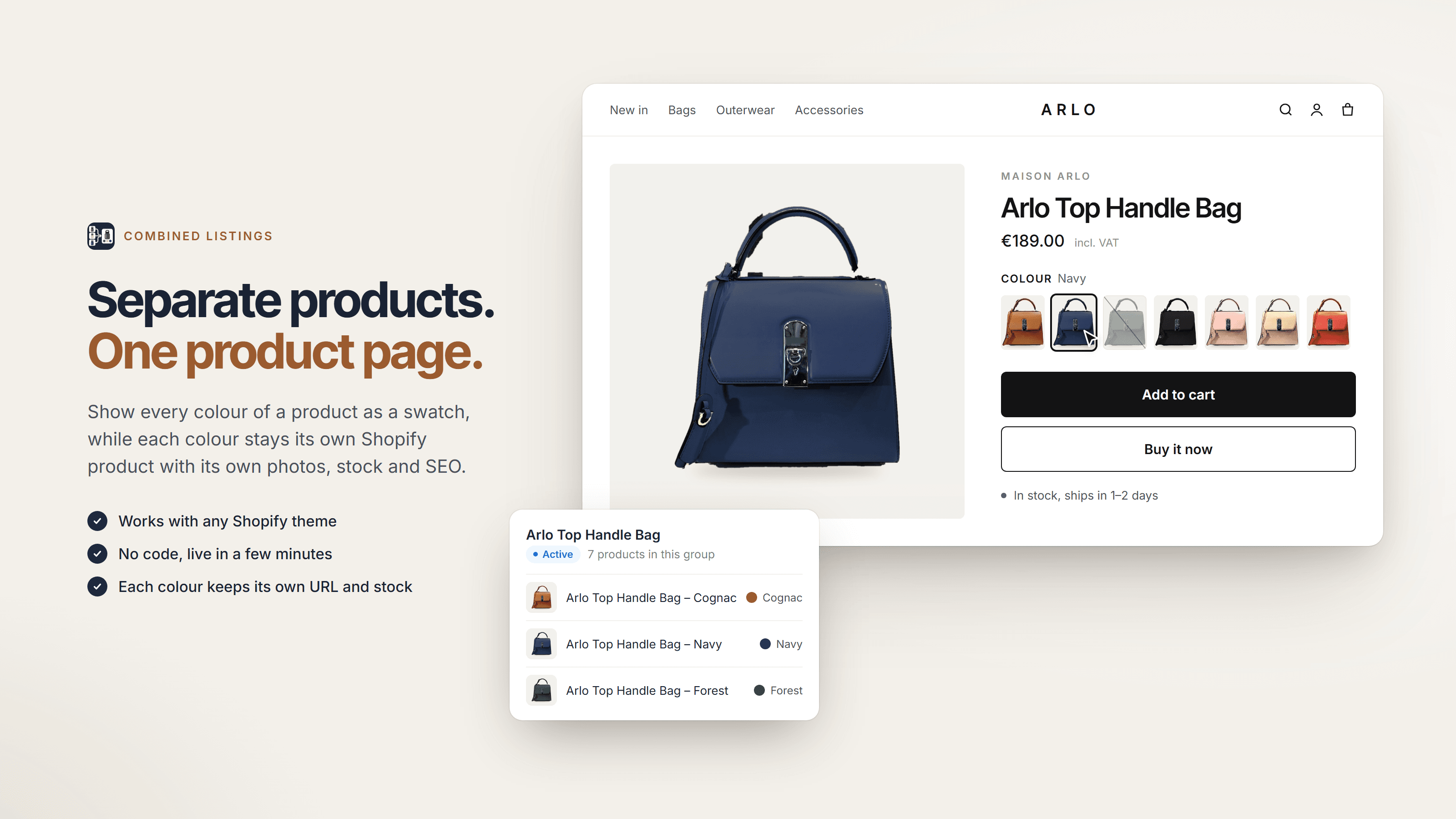
Product page of a handbag with seven colour swatches, each linking to a separate product, and the product group with its colours

Product page

Free in Starter

Shoppers see every colour you sell.

When each colour is a separate product, the product page never shows the others. The switcher puts all of them on the page as product images, colour swatches or text buttons. A click opens that colour’s own product page.

  • Works with every Online Store 2.0 theme
  • Added in the theme editor, no code
  • Only active products sold in the visitor’s market appear
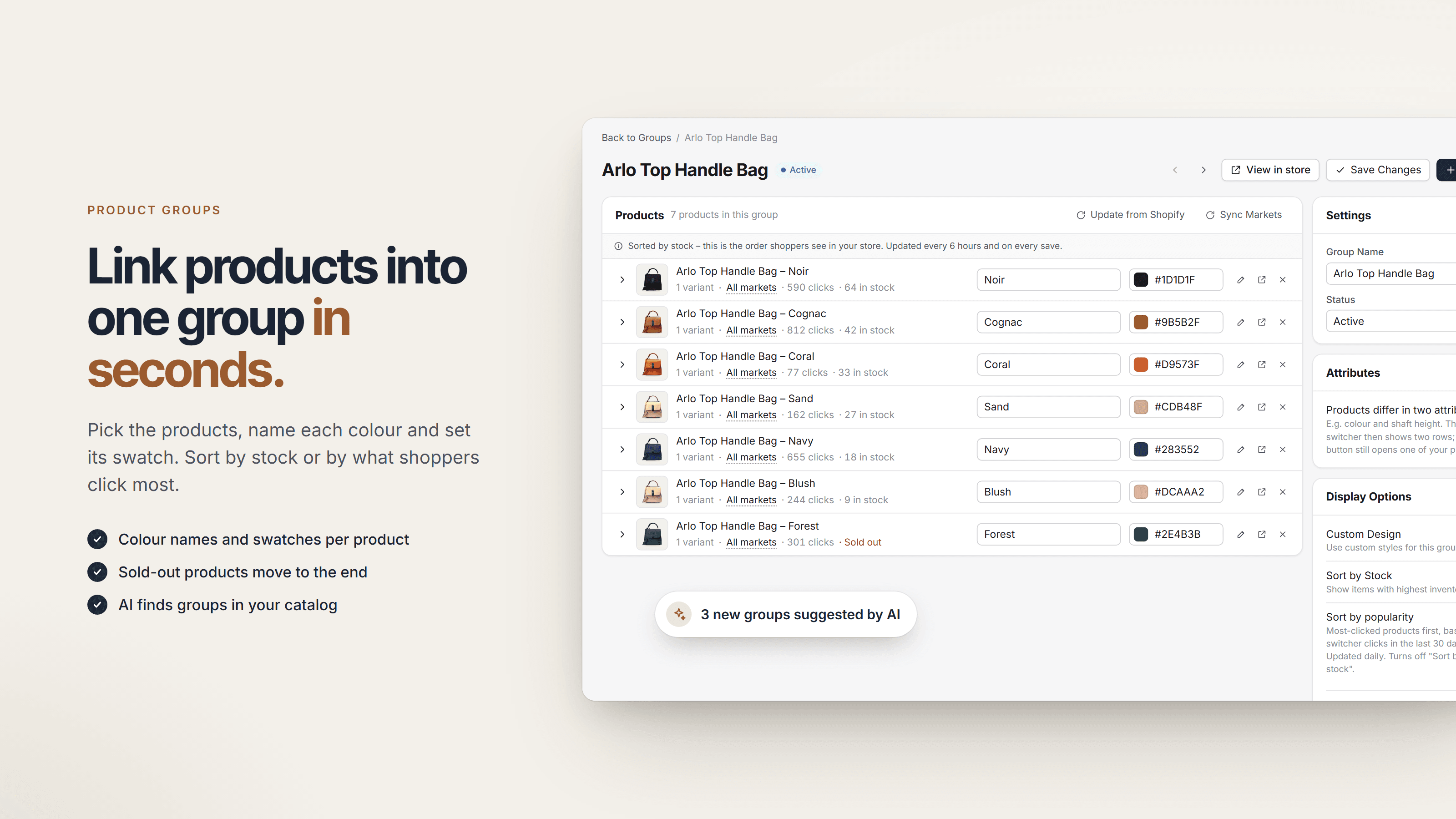
Group editor with seven bags, a colour name and swatch colour per product, clicks and stock, and a note about three groups suggested by AI

Product groups

Link products into one group in seconds.

Pick the products, name each colour and set its swatch. The colour picker can read the exact colour from the product image. Groups follow Shopify on their own: rename a product, change its image or delete it, and the group updates.

  • Clicks and stock per product right in the editor
  • Sort by stock (sold out last) or by most clicked
  • Groups as CSV, duplicate and undo
  • AI suggestions for new groups, you approve each one (Professional)
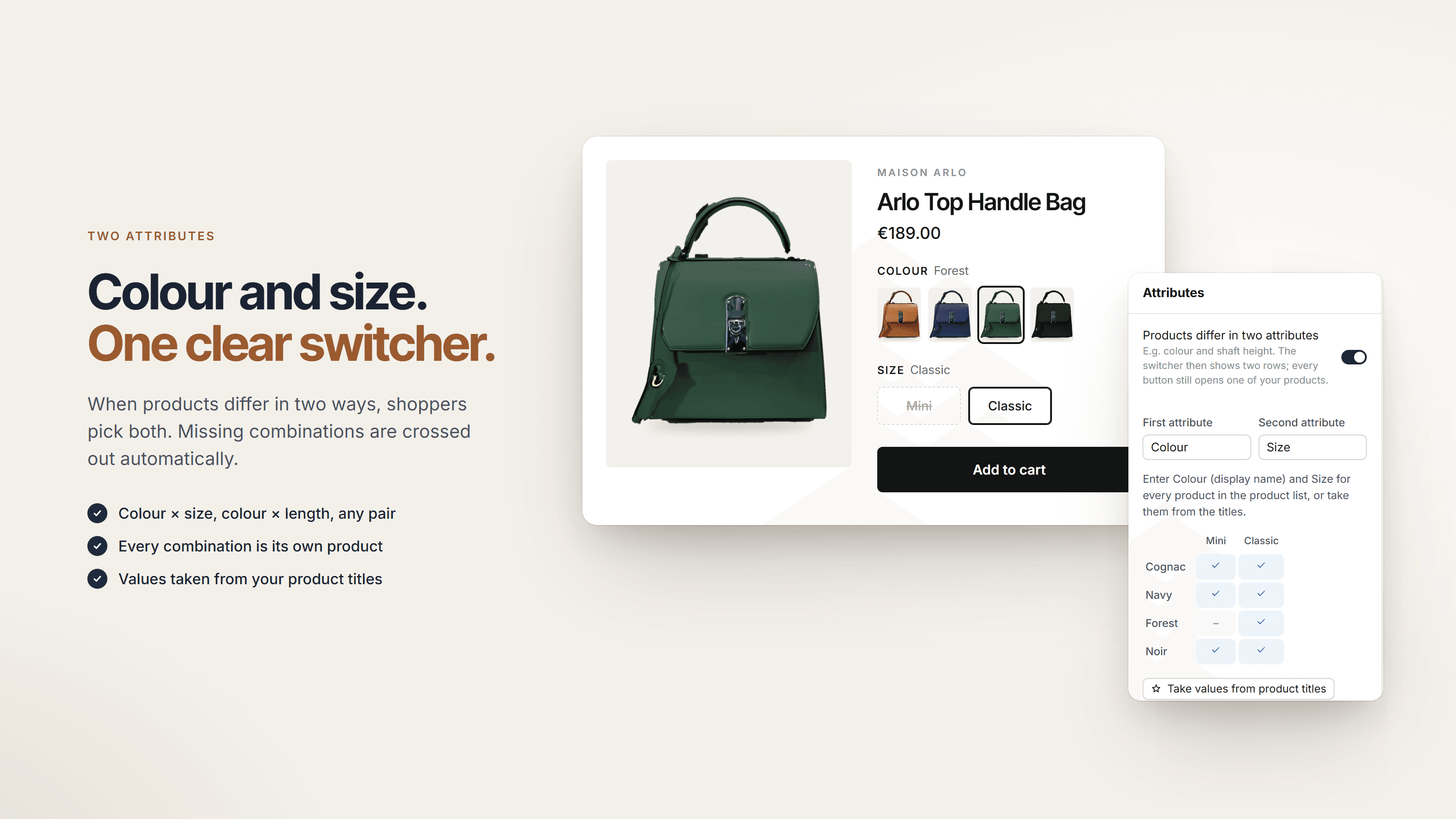
Switcher with a colour row and a size row where a missing combination is struck through, next to the attribute matrix in the group editor

Two attributes

Free in Starter

Colour and size. One clear switcher.

When the products of a group differ in two ways, such as colour and size or colour and shaft height, the switcher shows two labelled rows. Combinations that do not exist are struck through, and every button still opens one of your products.

  • Any pair of attributes, named by you
  • Overview of missing and duplicate combinations
  • Values taken from your product titles in one step
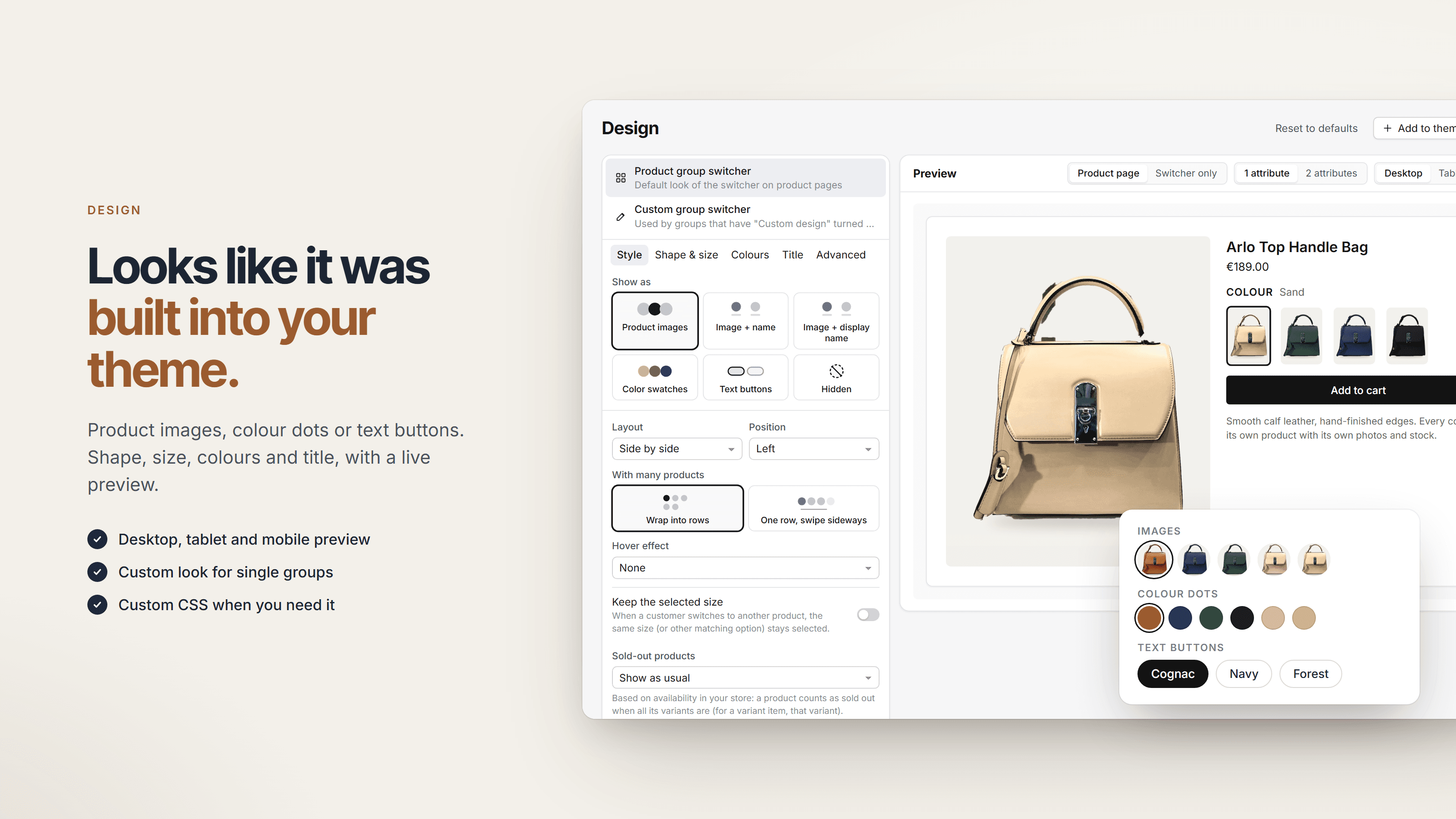
Design settings with display styles, layout and sold-out options next to a live preview of image swatches, colour dots and text buttons

Design

Free in Starter

Looks like it was built into your theme.

Choose product images, image with name, colour swatches or text buttons, then shape, size, colours and title. The preview shows your real products on desktop, tablet and mobile before you save.

  • Circle, rounded or square swatches, one swipeable row for many products
  • Dim or hide sold-out products
  • Keep the selected size when shoppers switch colour
  • Custom design per group and custom CSS
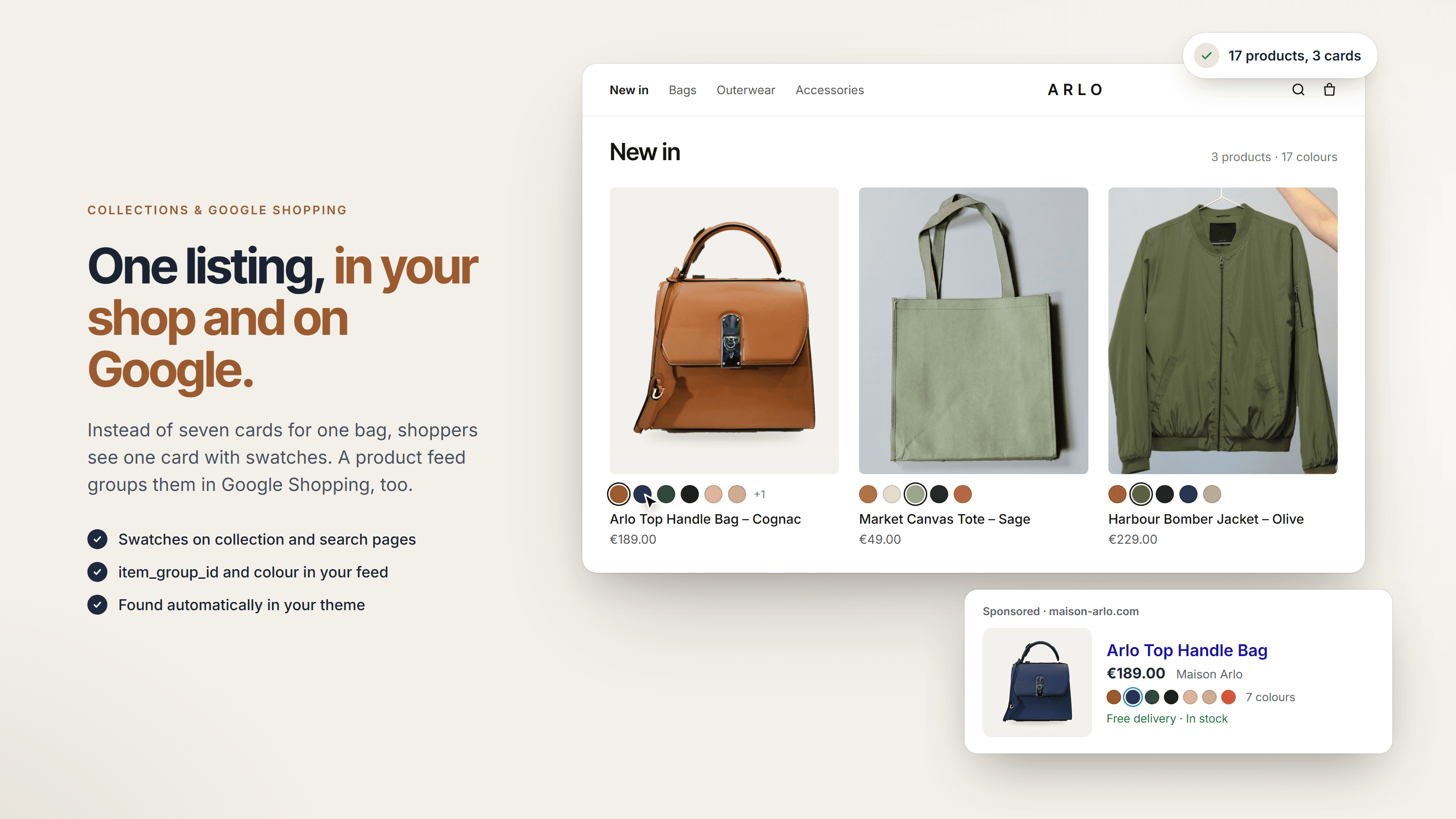
Collection page with one card per product group and colour swatches, plus a Google Shopping ad showing a bag in seven colours

Collections & Google Shopping

Free in Starter

One listing in your shop and in your feed.

On collection and search pages, a bag in seven colours becomes one card with swatches; choosing a swatch swaps image, title and link on the card. Feed fields such as item_group_id tell Google, Meta and feed apps which products belong together.

  • Collection cards found automatically in your theme
  • Feed fields per product and a supplemental feed for Google and Meta
  • Setup steps for Simprosys, DataFeedWatch and Channable
  • Optional schema.org ProductGroup on product pages
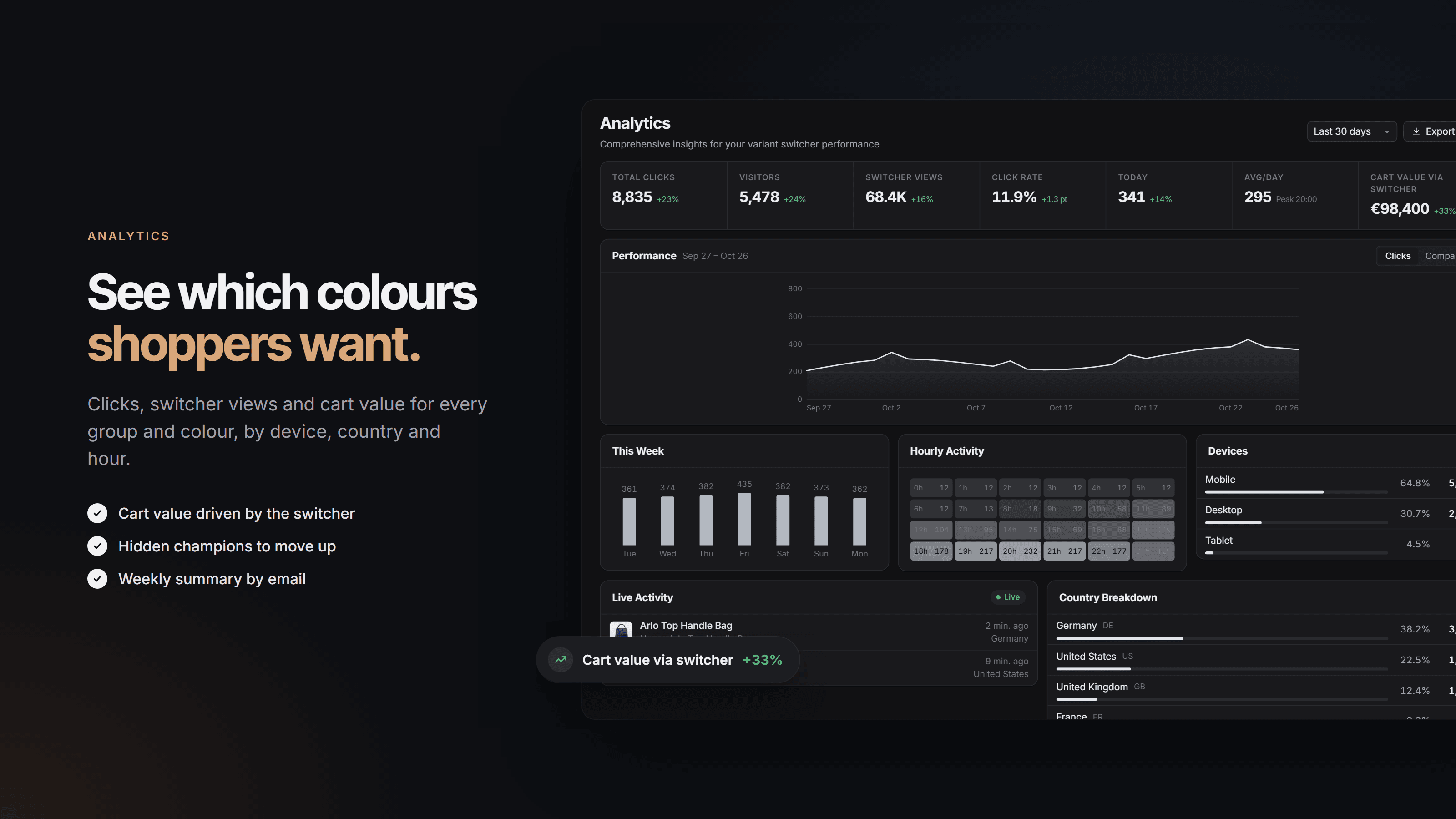
Analytics dashboard with total clicks, visitors, switcher views, click rate, cart value via switcher, hourly activity, devices and countries

Analytics

Enterprise

See which colours shoppers want.

Clicks, switcher views, click rate and the cart value that came through the switcher, per group and per colour. Break it down by device, country and hour, and get last week’s figures every Monday by email.

  • Cart value via the switcher, in total and per group
  • Products, groups, devices and countries on their own pages
  • Upsell analytics for the cross-selling blocks
  • CSV export and a weekly summary email

How it works

Live in a few minutes, no developer needed.

  1. Create a group

    Install Combined Listings, click New group and pick the products that belong together. Give each one a colour name and a swatch, then set the group to active.

  2. Add it to your theme

    Under Theme blocks, click Add to theme. The theme editor opens with the switcher already on your product page; you only click Save. Collection cards are one more switch.

  3. Fine-tune and measure

    Adjust the design with the live preview, set up the product feed for Google Shopping and, on Enterprise, follow clicks and cart value per colour.

Pricing

Start free. Upgrade when the groups grow.

Every plan has all swatch styles, collection cards and the product feed. The plans differ in the number of groups and in AI grouping, cross-selling and analytics.

Starter

Free forever for small stores.

Free

Start free
  • Up to 3 product groups
  • Up to 10 products per group
  • All swatch styles and design options
  • Collection cards and product feed
  • Community support

Professional

For growing stores with more product families.

$14.99/month

or $149.99/year · 14-day free trial

Try Professional free
  • Everything in Starter
  • Up to 25 product groups
  • Unlimited products per group
  • AI auto-grouping
  • Priority support
Most complete

Enterprise

Unlimited groups, cross-selling and analytics per colour.

$24.99/month

or $249.99/year · 14-day free trial

Try Enterprise free
  • Everything in Professional
  • Unlimited product groups
  • Cross-selling and cart upsells
  • Analytics per colour and group
  • Weekly summary email
  • Premium support
  • Dedicated account manager
  • Prices in US dollars, billed through Shopify. Pay monthly, or yearly and save about 17%.
  • The 14-day free trial applies once per store. Switch plans or go back to Starter anytime in the app.

FAQ

Questions, answered.

Show every colour you sell.

Install Combined Listings, create your first group and add the switcher in the theme editor. Starter is free with no time limit; paid plans from $14.99 a month, with a 14-day free trial.