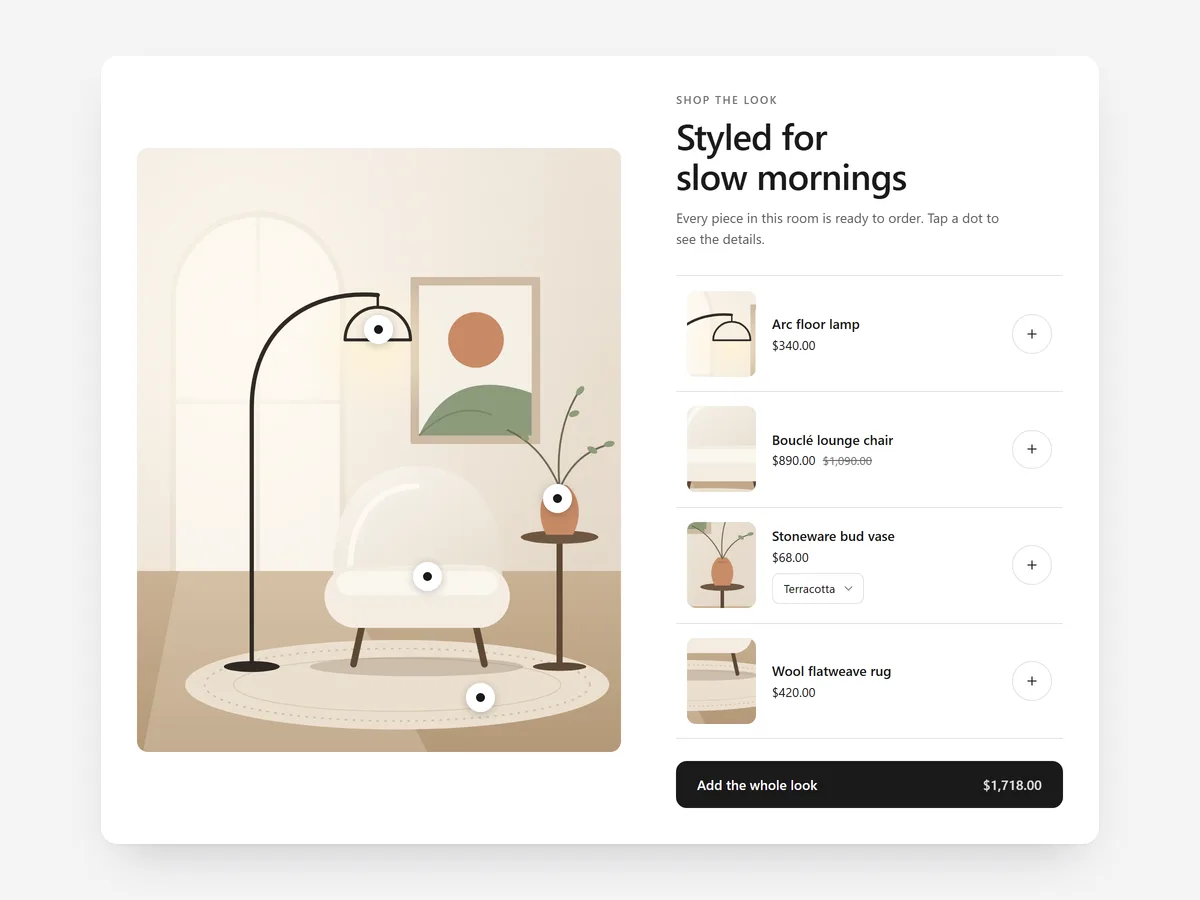
Lifestyle photos sell a feeling, but shoppers who like what they see then have to hunt for each item in your menu. Every extra search between "I want that lamp" and the product page is a chance to give up.
Why it matters
Fashion, furniture and home brands invest in styled shoots, then use them as decoration. A shopper sees a styled living room, wants the throw and the side table, and finds nothing to click. The photo did its job and the store did not.
Making the image shoppable closes that gap. It also raises order size naturally: when a look is styled well, shoppers often want more than one piece from it, and they can add them without leaving the page.
What the section does
Shop the Look places product hotspots on your photos. It fits the home page, collection pages for styled ranges, and lookbook or campaign content pages.
- 01You click on your photo to place hotspots exactly on each product, without measuring coordinates.
- 02Live prices, variants and stock come from your store, so the image never shows outdated information.
- 03Shoppers can add a single piece or the whole look to the cart in one go.
- 04On phones, products open as a card or a bottom sheet, so tapping a hotspot stays comfortable on a small screen.
Where to place it and what to write
On the home page, use one strong look below the hero or a collection grid. On collection pages, place it above the products to show how items combine. On lookbook pages, stack several looks.
- 01Use photos where products are clearly visible and not cropped at the edge.
- 02Tag three to six products per image; more hotspots crowd the photo.
- 03Give each look a short name and one line on the occasion ("Sunday brunch, linen basics").
Set it up in three steps
After saving, tap every hotspot in the mobile preview and add the whole look to the cart once to confirm it works. Check prices match the product pages and the theme font is used. Speed is unaffected because the block renders plain HTML and CSS.
- 01Open Shop the Look in Section Store, upload your photo, click to place hotspots and link each to a product in the visual builder.
- 02Click Theme blocks → Add to theme; the theme editor opens with the block already placed.
- 03Position it and save the theme.
Conclusion
Shoppable images turn your best photography into a direct path to the cart. The Shop the Look section is a one-time purchase of $24.99 in Section Store, or part of the Enterprise Plan.
Key takeaways
- 01Hotspots let shoppers buy straight from lifestyle photos.
- 02Live prices, variants and stock keep every look accurate.
- 03Adding the whole look in one click encourages larger orders.
Explore more