
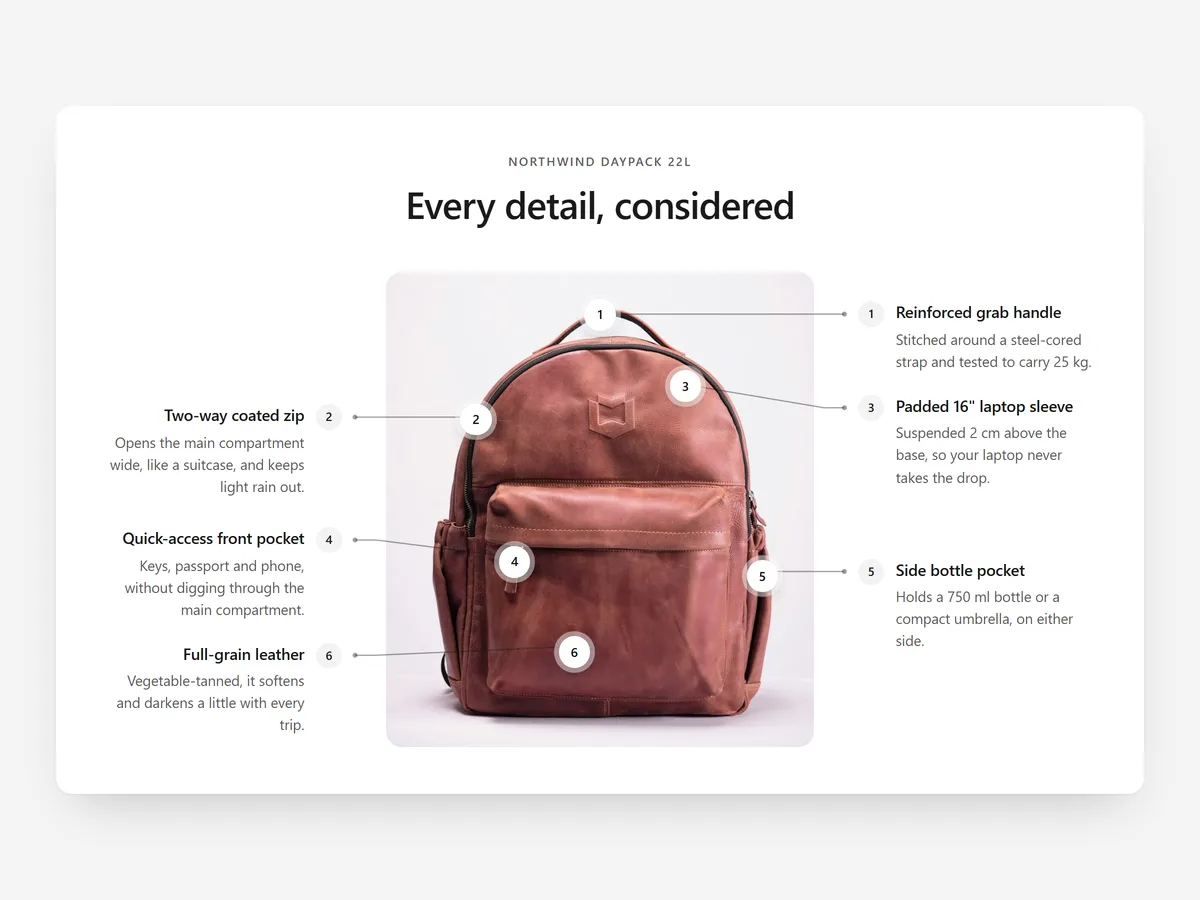
A backpack with a hidden laptop sleeve or a jacket with a two-way zip looks like any other in a normal photo. Shoppers pay for details they can see, and they cannot see details nobody points at.
Why it matters
Feature lists in the description say 'magnetic closure' or 'reinforced base', but the shopper has to guess where those are on the product. The connection between the words and the photo is left to the imagination.
An annotated image makes that connection for them. It is the online version of a sales assistant turning the product in their hands and saying 'and this is where your keys go'. For products in a crowded category, those details are often the only reason to choose yours.
What the section does
Product Anatomy shows an annotated product image with numbered callouts synced to a feature list. It fits the product page and also works on the home page to explain a hero product.
- 01Callouts use elbow or straight leader lines, so labels stay readable even on busy images.
- 02Numbered pins link to a feature list, and the two stay in sync as shoppers explore.
- 03You can use two images, for example closed and open, to show inside and outside.
- 04Points are placed by clicking on the image in the builder, with no coordinates to type.
Where to place it and what to write
On the product page, place it right after the gallery or description, where shoppers look for detail. On the home page, use it for one flagship product rather than a range.
- 01Pick five to eight details that justify the price.
- 02Name each point by its benefit: 'Padded laptop sleeve, fits 15 inch'.
- 03Use a clean image on a plain background so lines stay visible.
- 04Use the second image only when the inside really differs.
Set it up in three steps
After saving, check the mobile preview to make sure pins do not overlap and the feature list stays readable. Confirm the theme font is used. Speed is unaffected because the block renders plain HTML and CSS.
- 01Open Product Anatomy in Section Store, upload your image, click to place points and write the feature list in the visual builder.
- 02Click Theme blocks → Add to theme to open the theme editor with the block placed.
- 03Move it into position and save.
Conclusion
Pointing at the details shows shoppers why your product costs what it does. The Product Anatomy section is a one-time purchase of $14.99 in Section Store, or part of the Enterprise Plan.
Key takeaways
- 01Annotated images connect feature text to the real spot on the product.
- 02Five to eight benefit-led callouts are clearer than a crowded diagram.
- 03Use two images to show closed and open or inside and outside.
Explore more




