
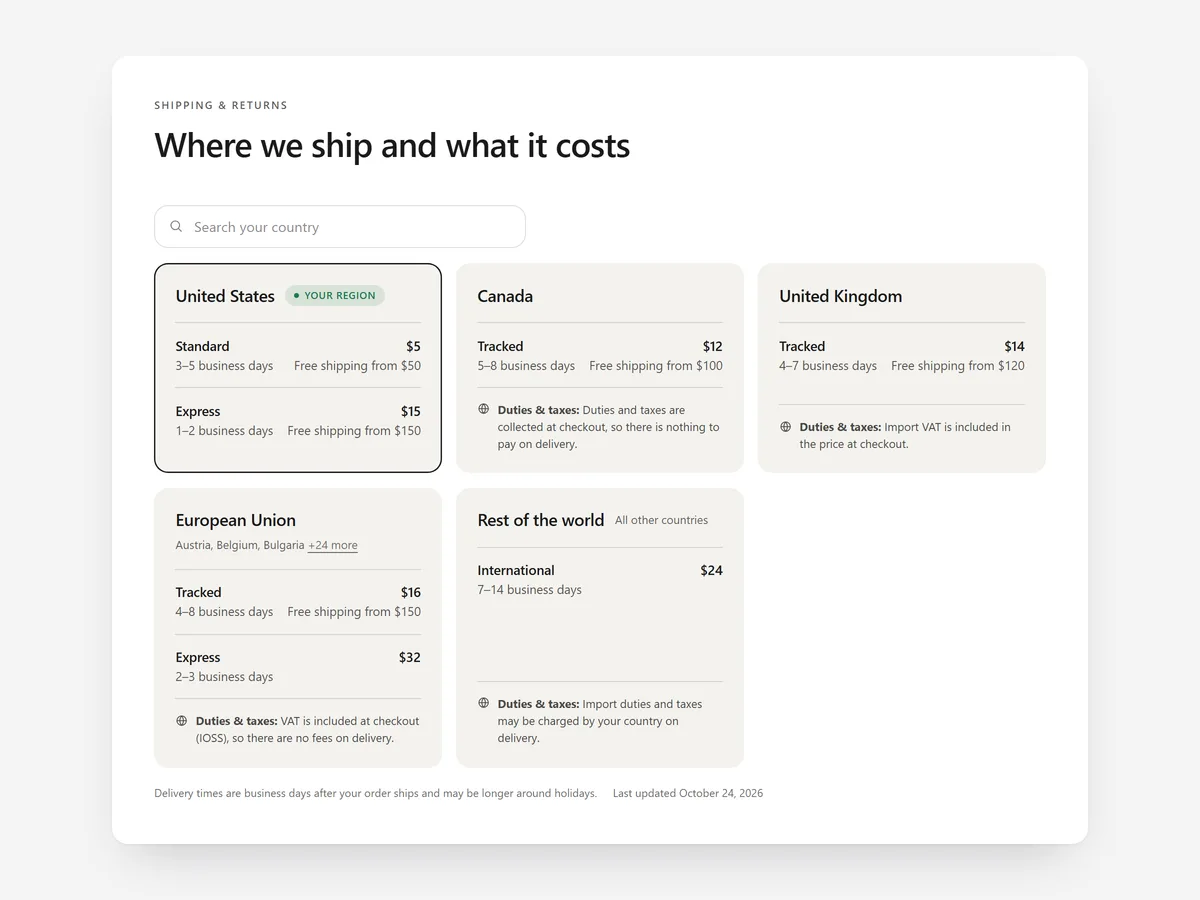
Shipping costs that appear late are one of the most familiar reasons for an abandoned checkout. Shoppers who can find the cost, the delivery time and the return terms before they start are far more relaxed about ordering.
Why it matters
Many shipping pages are legal text copied from a template, with rates hidden in a paragraph and nothing about duties. International shoppers especially want to know what it costs to their country and whether extra charges come on delivery.
This section is for stores that ship by carrier to many regions. If you deliver locally by zone, the Delivery Area Checker fits better; this table is the reference page that answers every shipping and returns question in one place.
What the section does
Shipping & Returns Table builds a clear shipping page with rates, delivery times, thresholds, duties and a returns summary. It belongs on the shipping page and works as a compact block in the cart or footer area.
- 01Rates and delivery times are shown by region and shipping method, so standard and express are easy to compare.
- 02A country search works in every language, so shoppers find their country by its own name.
- 03The shopper's region is shown first, with an approximate amount in their local currency.
- 04A returns panel and short answers cover the questions people ask after reading the rates.
Where to place it and what to write
Make it the main content of your shipping page and link it from the footer, the product page near the add-to-cart button and the cart.
- 01Lead with the free-shipping threshold if you have one.
- 02Give delivery times as working-day ranges, not promises.
- 03Say clearly whether duties are included for each region.
- 04Summarise returns in three lines and link to the full policy.
Set it up in three steps
After saving, search for a few countries on your phone and check that your own region appears first. Confirm the theme font is used. Speed is unaffected because the block renders plain HTML and CSS.
- 01Open Shipping & Returns Table in Section Store, enter regions, methods, rates, times and returns answers in the visual builder.
- 02Click Theme blocks → Add to theme; the theme editor opens with the block placed.
- 03Put it on your shipping page template and save.
Conclusion
A shipping page that answers cost, time, duties and returns removes the late surprise that stops checkouts. The Shipping & Returns Table section is a one-time purchase of $9.99 in Section Store, or part of the Enterprise Plan.
Key takeaways
- 01Show shipping costs before checkout, not during it.
- 02Country search and region-first display help international shoppers.
- 03Keep the table in sync with your real carrier rates.
Explore more




