Products that cost more up front but save money later, such as reusable bottles, refill systems or water filters, are hard to sell on price alone. Shoppers need to see the saving for their own habits, not a generic claim. When they set the numbers themselves, they believe the result.
Why it matters
Savings claims on product pages tend to be one bold number with no explanation. Sceptical shoppers dismiss it, and they are right to, because it was not calculated for them.
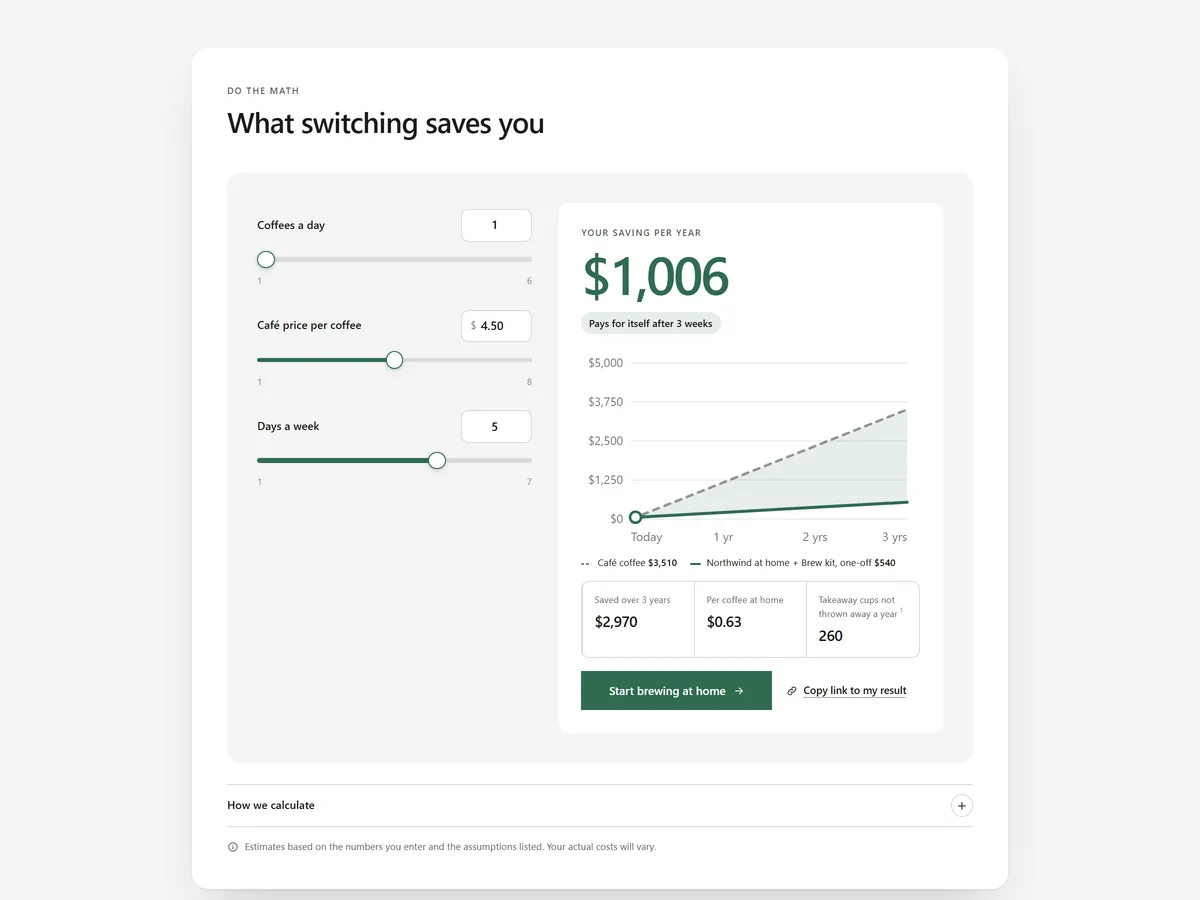
A calculator that uses the shopper's own usage and shows its assumptions turns a claim into a check they can run. It differs from the Coverage Calculator, which works out quantities; pick Savings Calculator when the purchase is justified by money saved over time.
What the section does
Savings Calculator fits product pages, the home page and landing pages for products with a clear cost comparison.
- 01Sliders with number fields let shoppers enter their own habits, calculated with your own formulas.
- 02An animated cost chart shows both options over time and marks the break-even point.
- 03You can lay it out side by side or step by step, depending on how much explanation is needed.
- 04Formulas, assumptions and sources are listed openly, so shoppers can see how the result is made.
Where to place it and what to write
On the product page, place it below the main buy box and before reviews, where shoppers weigh the price. On a landing page, it can follow the hero directly.
- 01Use a headline that names the comparison, such as "Your bottle versus buying water".
- 02Set slider defaults to typical habits, not extremes that inflate the result.
- 03Cite where your comparison prices come from in the sources list.
- 04Keep it to two or three sliders; more inputs feel like a form.
Set it up in three steps
After saving, move every slider to its limits and check the chart and break-even point still make sense. Test the sliders with a thumb on mobile. Speed is unaffected because the block renders plain HTML and CSS.
- 01Open Savings Calculator in Section Store, set the sliders, formulas, assumptions and sources in the visual builder.
- 02Click Theme blocks, then Add to theme; the theme editor opens with the block already placed.
- 03Position it below the buy box and save.
Conclusion
Savings Calculator lets shoppers prove the value of your product to themselves. The Savings Calculator section is a one-time purchase of $12.99 in Section Store, or part of the Enterprise Plan.
Key takeaways
- 01Shoppers enter their own habits, so the saving applies to them.
- 02Visible formulas, assumptions and sources make the result credible.
- 03Use realistic defaults and pair it with Coverage Calculator only when quantity also matters.
Explore more