A collection page is often where shoppers decide whether a shop has their kind of product. Many themes open it with a bare title and straight into the grid, leaving no explanation and no way to narrow down beyond the filter sidebar.
Why it matters
Shoppers arriving from search or ads land on collection pages more often than on the home page. If the page only says "Jackets" above a grid, they get no sense of the range and no shortcut to the waterproof ones they actually want.
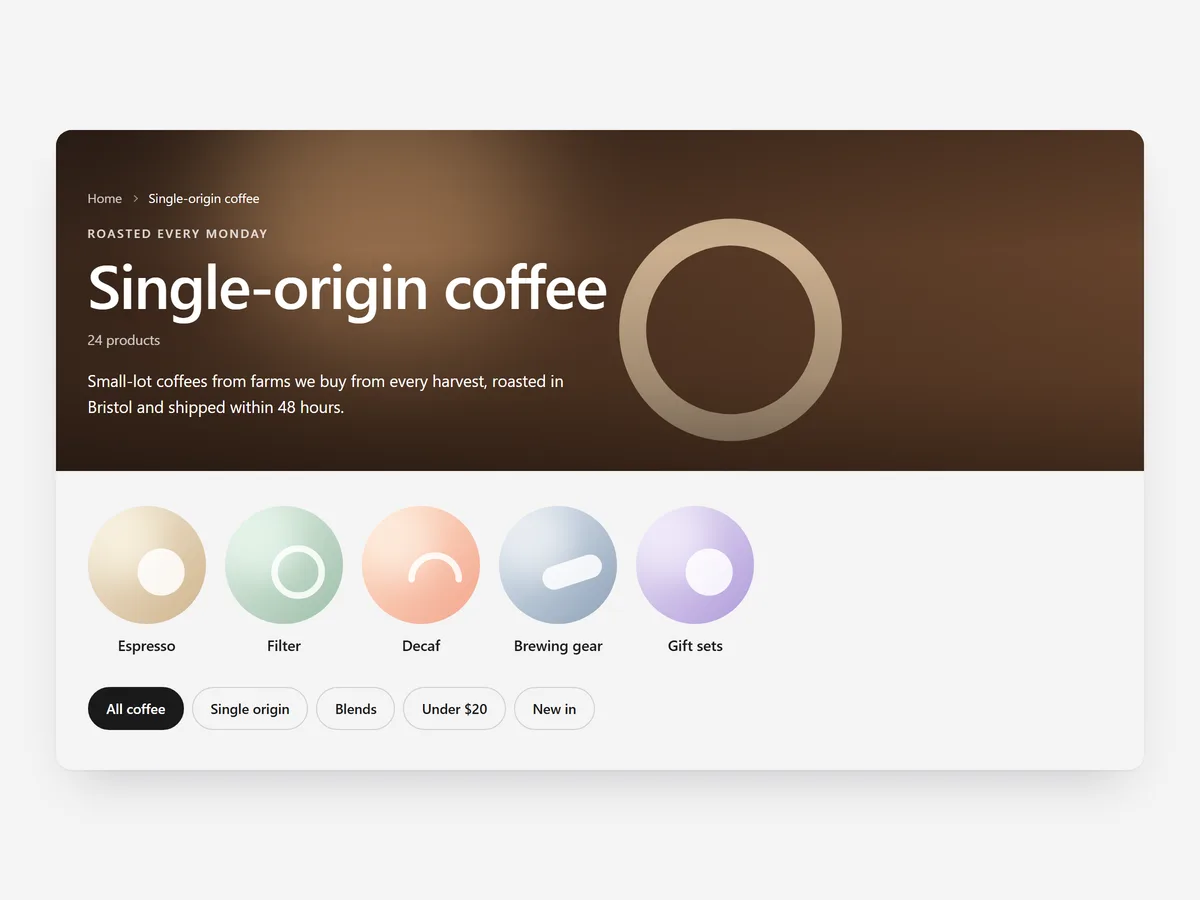
Collection Header turns the top of every collection into a short introduction with a path forward. Unlike Circle Menu, which you place once, it fills itself from each collection, so one setup covers the whole catalogue.
What the section does
Collection Header sits above the product grid on collection pages and builds itself from each collection's own content.
- 01It offers a banner, split or minimal layout, so image-led and text-led collections both look intentional.
- 02It fills itself from each collection with its title, image and description, so you do not set up every page by hand.
- 03Sub-collection cards and quick-filter chips give shoppers one-tap shortcuts into narrower ranges.
- 04Per-collection rules, video and a read-more toggle let key collections look different while long intros stay compact.
Where to place it and what to write
Place it at the very top of the collection template, above the product grid. The intro text comes from the collection description, so the writing happens in Shopify.
- 01Open the description with one sentence on who the collection is for.
- 02Keep the visible part to two lines; the read-more toggle holds the rest.
- 03Use filter chips for the two to five filters most shoppers apply, such as size or material.
- 04Add sub-collection cards only on parent collections, not on narrow ones.
Set it up in three steps
After saving, open several collections on your phone and check that each title, image and intro appears correctly. Text uses your theme's font by default. Speed is unaffected, because the block renders plain HTML and CSS.
- 01Open Collection Header in Section Store, choose a layout, set chips, cards and rules, and check the live preview on desktop, tablet and mobile.
- 02Click Theme blocks, then Add to theme; the theme editor opens on the collection template with the block placed.
- 03Hide the theme's own collection banner and save.
Conclusion
Collection Header gives every collection a clear opening and quick ways to narrow down, from one setup. The Collection Header section is a one-time purchase of $19.99 in Section Store, or part of the Enterprise Plan.
Key takeaways
- 01Collection pages are frequent landing pages and deserve an introduction, not just a title.
- 02The header fills itself from each collection, so one setup covers the catalogue.
- 03Filter chips and sub-collection cards give shoppers one-tap shortcuts.